Send a free replacement from the order page, linked both ways
An item arrives broken, missing or wrong, and you send another. Shopify has no replacement button, so shops make a new order with a 100% discount and type a note. RNS Replacement Orders adds Create replacement to the order page.
Free plan · Pro $12 a month · 14-day free trial · billed by Shopify
↑ the replacement order card
How it works
- Open the order that went wrongand choose More actions › Create replacement.
- Tick the items,pick a reason and choose where it ships.
- CreateYou get a $0 order with no payment, linked to the original both ways. Stock is taken and the customer is told it's on its way.
THE APP · 4 REAL SCREENS
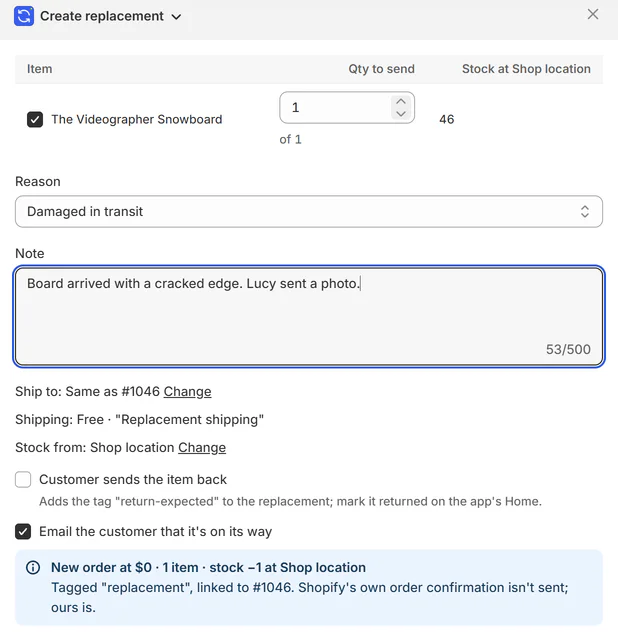
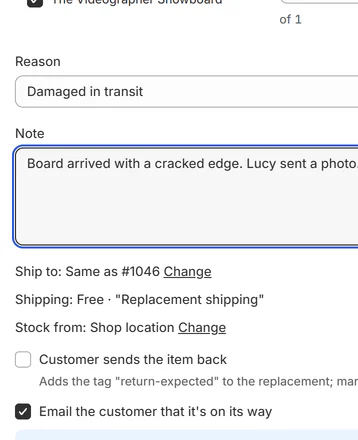
Create replacement box on the order: item, reason, note.
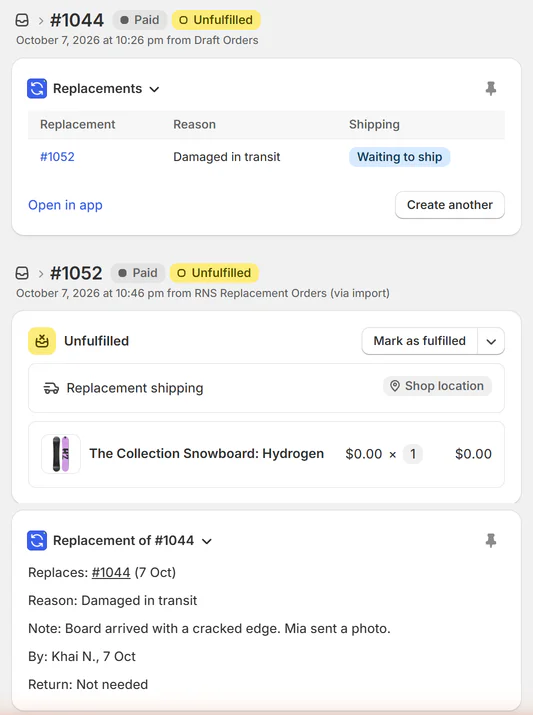
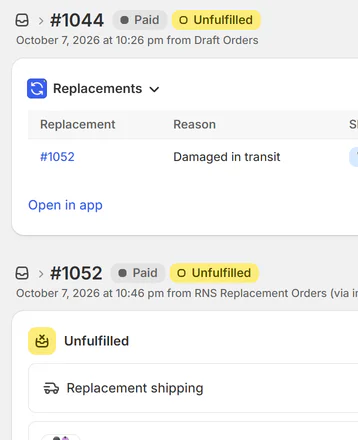
Original and replacement orders, each linked to the other.
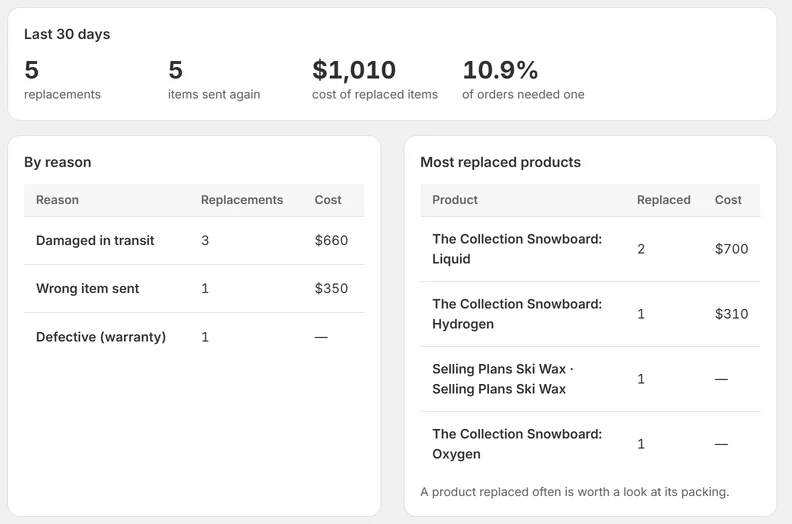
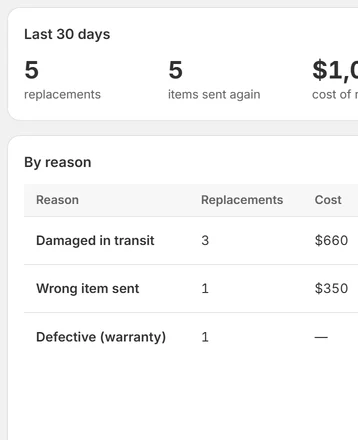
Home: replacement cost by reason and most replaced products.
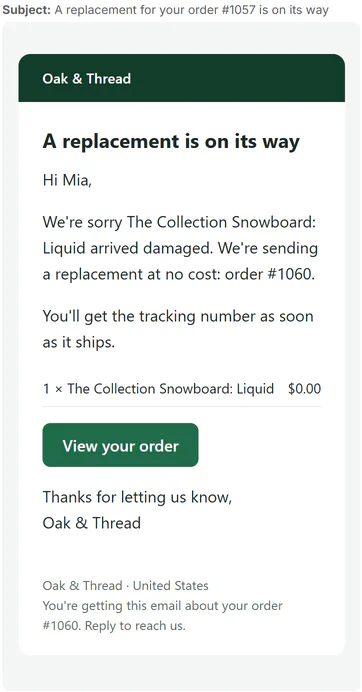
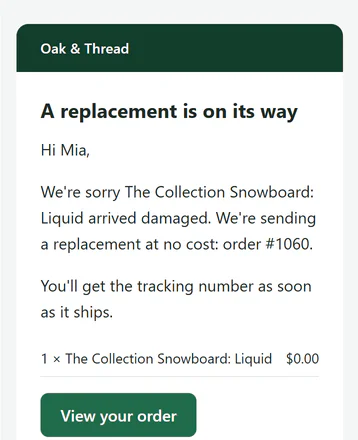
The replacement email as the customer gets it.
THE APP · 4 SCREENS · SWIPE
What you get
- Create a $0 replacement from the original order page
- Both orders linked and tagged, with the reason and a note
- Stock taken at the location you choose
- The customer gets a "replacement on its way" email in your words
- See what replacements cost you by reason and by product
- Monthly cost report and CSV for your accountant (Pro)
What it can't do
- The replacement is a real $0 order in Shopify. Check how your ad tools treat $0 orders.
- The order-page card has to be added once (Blocks › + Block, then pin it).
Plans and price
- 10 replacements a month
- Unlimited replacements
- Monthly cost report by reason and product, cost CSV
Questions
Does the replacement count as a sale?
It's a $0 order with no payment, tagged replacement, so it adds nothing to your sales.
I can't see the card on the order page.
Staff add it once: order page › Blocks › + Block › Replacements, then pin it.
How do I undo a replacement?
Cancel the replacement order in Shopify; the app shows it as Cancelled.
What does the app read about my customers?
The name, email and shipping address on the original order, and its items. Phone numbers aren't read.
Set up and use
6 steps
- Install: the app opens on Home, already on Free (upgrade any time on the Plan page). Settings › Reasons: six ready-made reasons; add your own (one per line), untick "Offer it" to hide one, "Return needed by default" per reason. Settings › The replacement order: the two tags, the shipping line's name, where stock comes from, Shopify's own order confirmation (off by default), the return note.
- Email templates: "Replacement on its way" in your wording. Send yourself a test first: emails go to customers from the start.
- Open the order that went wrong › More actions › Create replacement: tick the items and how many (up to what was ordered; stock at the location shown), reason, note, ship to (the original's address or a new one), "Customer sends the damaged item back", "Email the customer". Create.
- The app creates a $0 order (the items at a $0 price, $0 "Replacement shipping", no payment), tagged replacement (+ return-expected), with a note and a metafield pointing to the original; tags the original replaced and lists its replacements in a metafield; takes the stock; emails the customer.
- Fulfill the replacement like any order. Both orders show a card: on the original "Replacements" (with "Create another"); on the replacement "Replacement of #…" (reason, note, who, return).
- Home: replacements in the last 30 days, items sent again, their cost (item cost in Shopify × qty), share of orders that needed one; by reason; most replaced products; the list with filters, a drawer per row (timeline, the email as sent, Resend). To undo, cancel the replacement in Shopify: it shows as Cancelled.
Why RNS
- Create a replacement from the original order: a $0 order, linked and tagged
- The customer gets a "replacement on its way" email in your words
- See what replacements cost you, by reason and by product
Learn more
- Guide: How to send a free replacement order in Shopify
- Help: email support@rnsapps.com with your store address. We answer within one working day.