Consignment, inside Shopify POS
For one shop that sells on consignment. Shopify has no consignment. So shops bend the Vendor field, ring items up as custom sales and keep the splits in a spreadsheet, or run a second POS beside Shopify. RNS Consignment runs it all inside Shopify and Shopify POS.
Free plan · Pro $59 a month ($590 a year) · 14-day free trial · billed by Shopify
- Works on POS Lite and POS Pro
- Free for 15 consignors
- Test mode at install: no consignor emails
Two items taken in for a consignor, then one sells and her split lands on her balance. Sample consignor and amounts.
How it works
- Take items in at the counterFind or add the consignor on the POS, add their items with price and photo, see the split, print barcode tags and an intake receipt. Consignors can also enter items for you to approve.
- Sell as usualItems are normal Shopify products, in store and online. Every sale is split by your rules and fees; refunds and edits reverse it, even after a payout.
- Mark down and end contractsOld stock drops in price on your schedule, never below the floor. When a contract ends, items go back, get donated or become yours.
- Pay out without mistakesShopify store credit at the counter, or a record of a cash, cheque, e-transfer or other payment. Each sale is paid once. Monthly statements go out on their own, and consignors check their balance in a portal.
THE APP · 6 REAL SCREENS
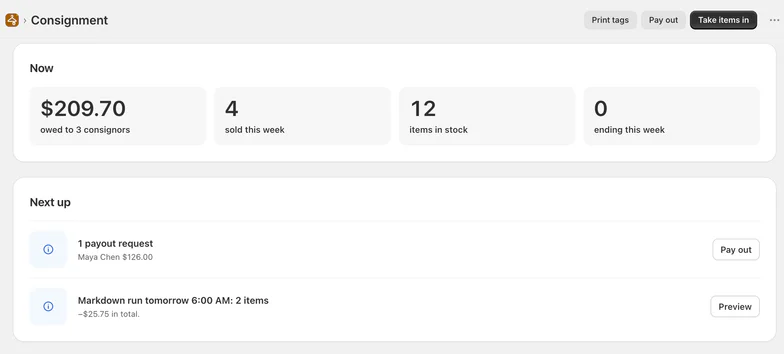
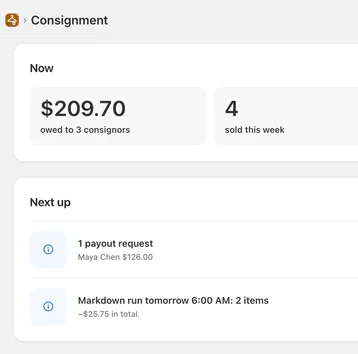
Home: what the shop owes its consignors now, what sold this week, the next markdown run and this month's sales, splits and payouts.
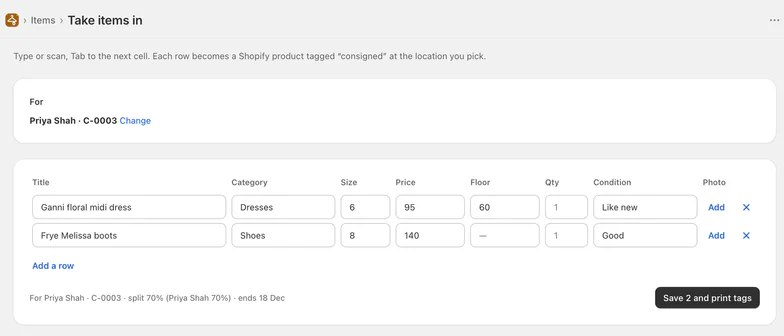
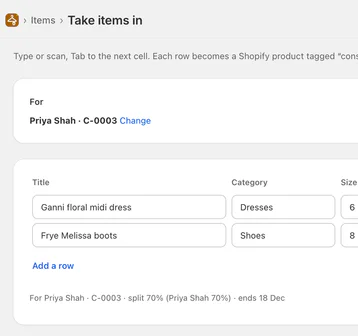
One intake for a consignor: each row becomes a Shopify product tagged consigned, with its floor price, and the split and end date shown before you save and print tags.
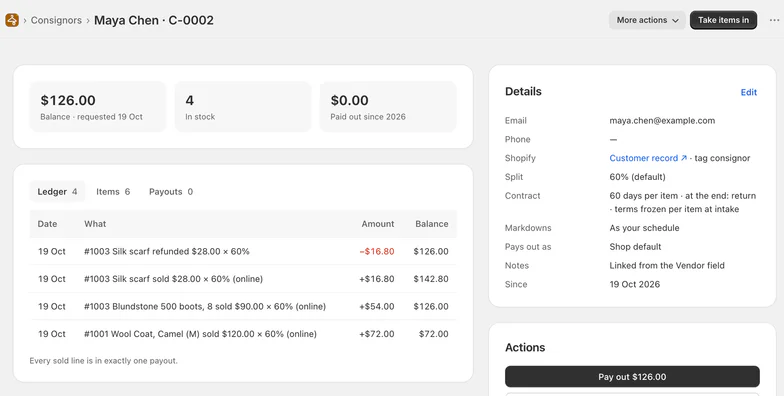
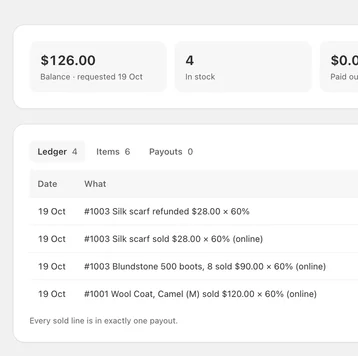
One consignor: balance, items in stock, the ledger line by line (a refund reverses its sale), their terms, and Pay out.
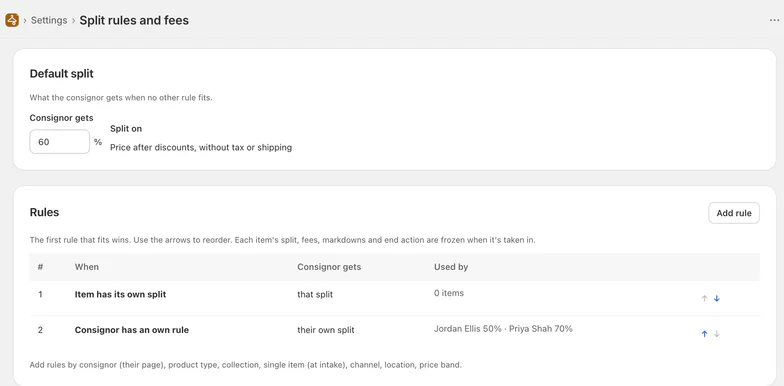
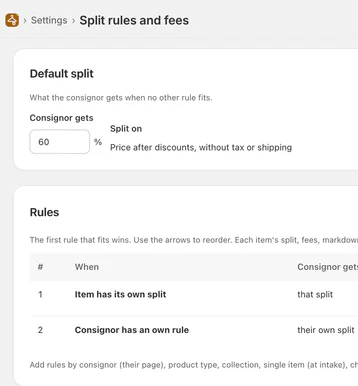
What the consignor gets when no rule fits, and the rules on top (the first that fits wins). Terms are frozen when an item is taken in.
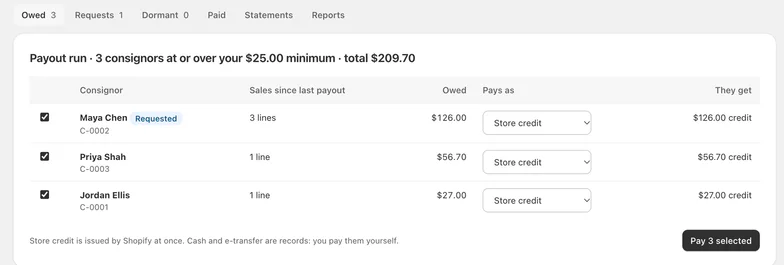
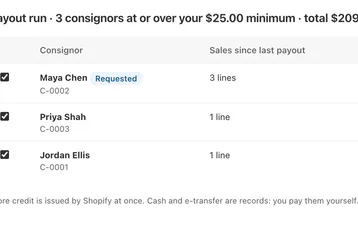
Everyone at or over your minimum in one run: what each is owed, and how they're paid. Store credit is Shopify's own; cash and e-transfer are records.
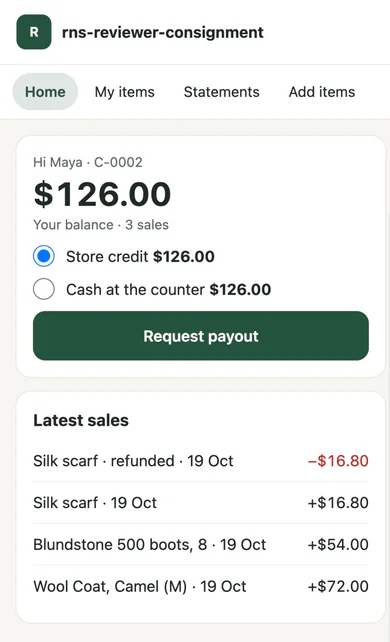
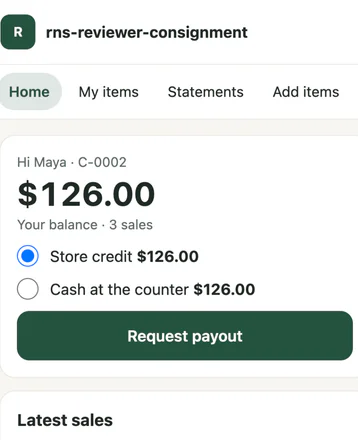
What a consignor sees from their emailed link: their balance, a payout request and their latest sales, a refund shown as its own line.
THE APP · 6 SCREENS · SWIPE
Who it's for
Shops that sell other people's things.
- 01Thrift, vintage and kids' resalehundreds of consignors, small items, fast intake at the counter.
- 02Bridal and formal resalehigh prices, long contracts, splits by price band.
- 03Luxury bags, watches and jewelleryone-of-a-kind items, careful payouts, statements.
- 04Furniture and home consignmentmarkdowns and pickups when contracts end.
What you get
- POS tile: consignor lookup, intake, tags and receipts, payouts at the counter
- Split rules by consignor, category, channel and price band; intake, monthly and payout fees
- Terms frozen at intake, so changing your rules never surprises a consignor
- Markdown schedules with floor prices and a preview before each run
- Contracts with end actions; lost or damaged items paid fairly
- Payout runs and requests, store credit or cash records, monthly PDF statements emailed on the 1st
- Consignor portal by emailed link (and "My consignments" in the customer account on Pro)
- Import from a spreadsheet, Visceral, ConsignCloud or SimpleConsign; reports of what you owe; split rules per location on Multi-store
What it can't do
- Send money: payouts are Shopify store credit, or a record of what you paid outside the app.
- Work offline at the counter: lookup and tags need a connection; sales still count when the order syncs.
- Be a marketplace: consignors can't sign up, list or sell, and they never take payment from a buyer; your shop sells everything.
- Buy items outright: that's RNS Buy Counter, and the two work together.
Plans and price
- Up to 15 consignors, 1 location
- POS intake, tags, splits and fees, refunds
- Store credit and cash payouts, statements
- Markdowns, contracts, the portal link, import
- Up to 100 consignors, 1 location
- Everything in Free
- Unlimited consignors, up to 3 locations
- Split rules by channel and price band
- Scheduled payout runs
- "My consignments" in the customer account
- Unlimited locations, everything in Pro
- Split rules per location
One free trial per shop. Shops using RNS Buy Counter or RNS Counter: 50% off the first 3 months of a monthly plan. Charged by consignors and locations, never by sales. Billed by Shopify.
Questions
Do I need POS Pro?
No. It works on POS Lite and POS Pro.
Does it move money?
No. Store credit is Shopify's own; cash, cheque, e-transfer or other payouts are records of what you paid outside the app.
Do I need new customer accounts?
For Shopify store credit payouts and "My consignments", yes. On classic customer accounts, pay by cash record and use the emailed-link portal, which works on any store.
Can I bring my consignors over?
Yes. Import your own consignors and items from a CSV file with a preset for your old system; a dry run shows what will change first. It is a one-time file import; the app connects to no other system.
What if I change my split?
Items already in stock keep the terms they came in on, unless you choose to update them; consignors are emailed first.
What about refunds after a payout?
A refund or an order edit reverses the split, even on orders older than 60 days. If the line was already paid out, the consignor's balance goes below zero and comes off their next sales.
How do consignors check their balance?
By an emailed single-use link to a page on your own domain (/apps/consign): balance, items, sales, statements and payout requests. On Pro there is also "My consignments" in Shopify's new customer accounts.
What happens if I leave?
You get every balance by email the moment you uninstall, with links to the full ledger (CSV) and balances (PDF) that work for 3 days; data is deleted 48 hours later.
Set up and use
6 steps
- Install the app. Free covers 15 consignors; paid plans have a 14-day free trial. Test mode is on: consignor emails are logged, not sent, and payouts are recorded without issuing store credit.
- Home: pick what you sell for a starting split and contract, add your consignors (or import them), and Try it on yourself to see a sample item's tag and split; the sample is removed after.
- In Shopify POS: add the Consignment tile (Point of Sale › Settings › POS app › Add tile › Apps › Consignment) and turn on Consignor (Apps for Point of Sale › Activate on). The customer screen then has Consignor too.
- Take items in: find the consignor, add each item with price, floor and photo, then save and print the tags. Each item becomes a Shopify product tagged consigned.
- Pay out: Payouts lists everyone owed; pay in Shopify store credit or record cash, cheque, e-transfer or a method you name. Statements are under Payouts › Statements and go out on the 1st with a PDF.
- Settings: split rules and fees, markdowns, contracts, the portal and emails. Turn Test mode off when you're ready for consignors to get emails and store credit.
Why RNS
- Runs inside Shopify and Shopify POS: no second POS, and your items stay normal Shopify products
- Pays in Shopify's own store credit or records what you paid; the app never moves money
- Never charged by sales; free for up to 15 consignors
Learn more
- Related: RNS Buy Counter buys used goods outright at the counter, for cash or store credit.
- Your data: what the app reads and keeps is on the privacy page.
- Help: email support@rnsapps.com with your store address. We answer within one working day.