Tell everyone who ordered a product, in one message
A shipment is late, an item is back-ordered, or there's a recall. You need to tell every buyer, but Shopify Email and Flow only reach people who agreed to marketing. RNS Email Product Buyers reaches the people who ordered, for order updates.
Free plan · Pro $15 a month · 14-day free trial · billed by Shopify
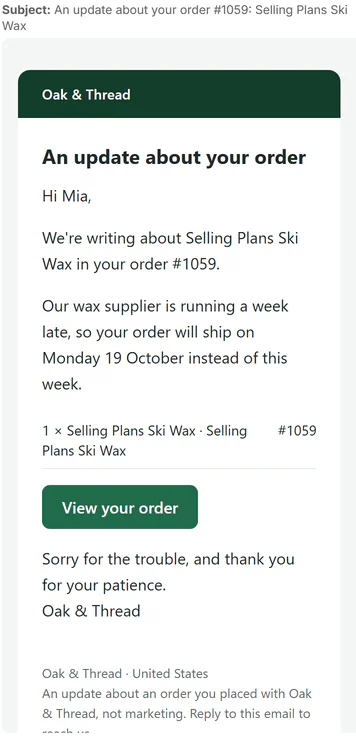
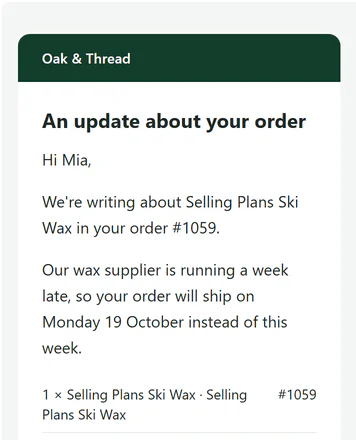
↑ the email to buyers
How it works
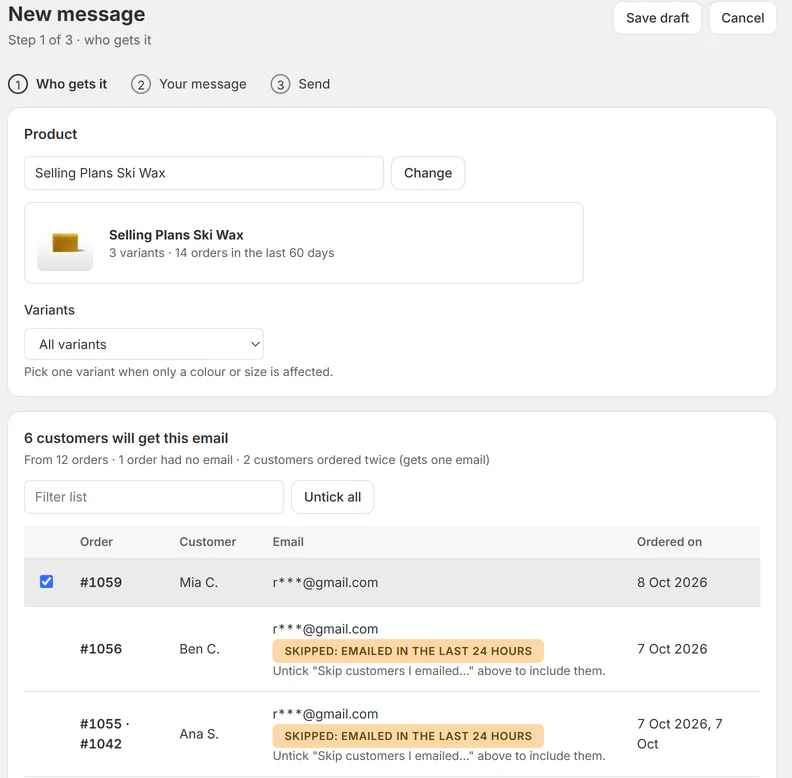
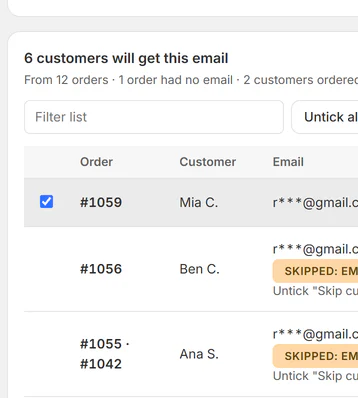
- Pick the product(all variants or some) and which orders. See every recipient: one email per customer.
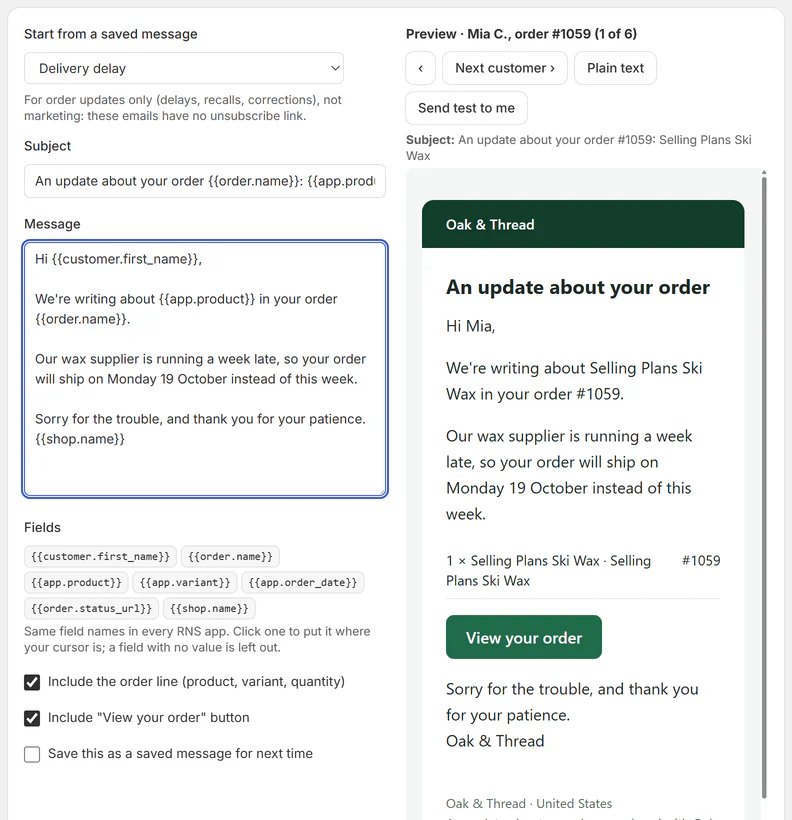
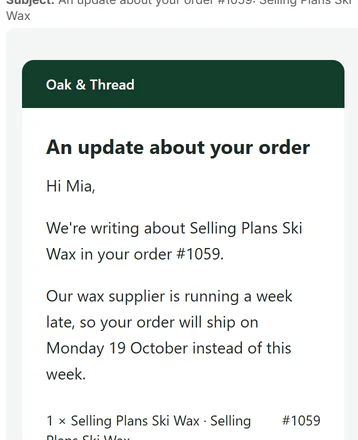
- Write your messagefrom a ready text (delay, backorder, recall, correction) and preview it as the first customer will see it.
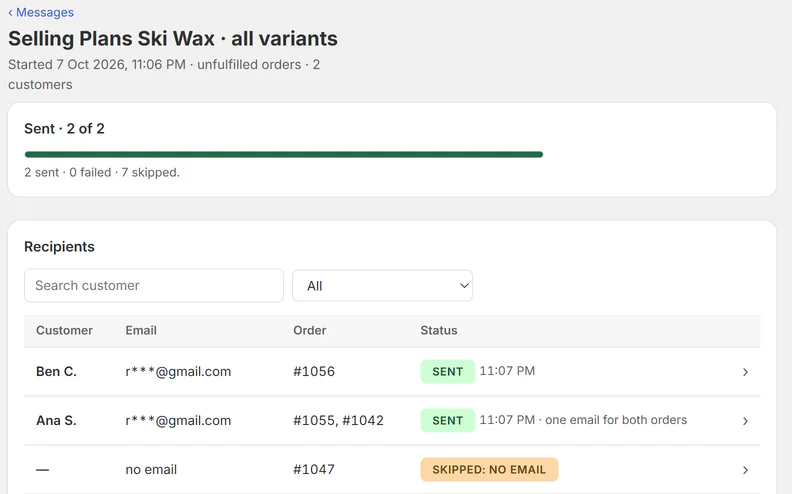
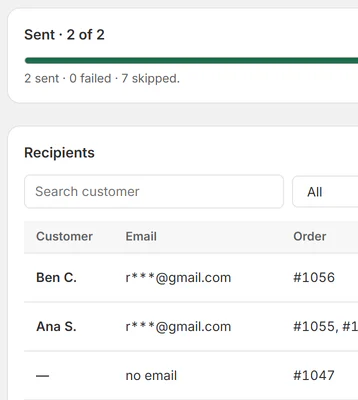
- SendEvery recipient's status is logged, and you can stop sending at any time.
THE APP · 4 REAL SCREENS
Step 1: pick a product, see who gets the email, one skipped.
Step 2: write the message with a live preview per customer.
Message page: sent 2 of 2, each recipient's status.
The update email as a buyer gets it.
THE APP · 4 SCREENS · SWIPE
What you get
- Email every customer who ordered a product: delays, recalls, backorders
- See and untick recipients before you send; one email per customer
- Start from ready texts or your own saved messages
- Preview the real email, send a test, then send; stop at any time
- Every recipient's status, plus resend to a different address
- Follow-ups, resend all failed and CSV export on Pro
What it can't do
- It's for order updates to people who bought the product, not for marketing.
- Orders from the last 60 days only (Shopify's limit for apps), and at most the newest 1,000 of them.
Plans and price
- 20 customers a month
- 4 ready messages + 4 of your own
- Unlimited customers and saved messages
- Follow-ups, resend all failed, CSV export, a copy to you
Questions
Is this for marketing?
No. It's for order updates to people who bought the product (delays, backorders, recalls, corrections). Use Shopify Email for marketing to people who agreed to it.
How far back can I reach buyers?
Orders from the last 60 days (Shopify's limit for apps).
A customer says they never got the email.
Home › Find a customer: search their email, see what happened, and send it to a different address.
What does the app read about my customers?
The name and email on the order, the order number and the items.
Set up and use
6 steps
- Install: the app opens on Home, already on Free (upgrade any time on the Plan page). Settings: the reply-to address (customers reply there). Messages go to customers from the start, so use Send test to me before you send.
- New message › 1 Who gets it: search the product; pick all variants, one, or several; pick which orders (unfulfilled only, all in the last 30 or 60 days, fulfilled only); skip customers emailed about this product in the last 24 hours; skip orders with some tags. The list has one row per customer (two orders = one email), orders with no email shown as Skipped, and your shop's own addresses unticked. Untick anyone.
- 2 Your message: start from a saved message (Delivery delay, Backorder, Recall / safety notice, Correction to instructions, or your own), edit the subject and text, insert fields, include the order line and the View your order button. The preview is the first customer's real email. Send test to me.
- 3 Send: a last look at product, who, subject and sender; a warning if the product had a message in the last 7 days; tick "I've checked"; Send. Emails go out in batches of 50 a minute.
- The message page: progress, Stop sending (cancels the queue, keeps what's sent), every recipient with status and reason, Send to a different address. Pro: Export CSV, Resend all failed, Send a follow-up to the same people.
- Home: the last 30 days, every message (drafts too), and Find a customer ("I never got your email").
Why RNS
- Preview the real email and send yourself a test before anyone gets it
- See each recipient's status, so you know who got it
- Resend all failed emails in one go (Pro)
Learn more
- Guide: How to email every customer who ordered a specific product in Shopify
- Help: email support@rnsapps.com with your store address. We answer within one working day.