Shoppers see the size they pick, in 3D
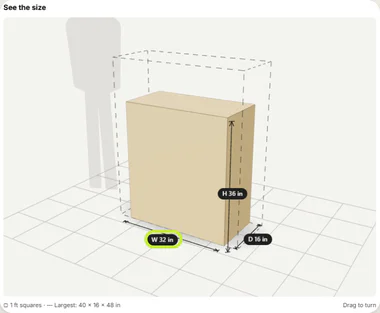
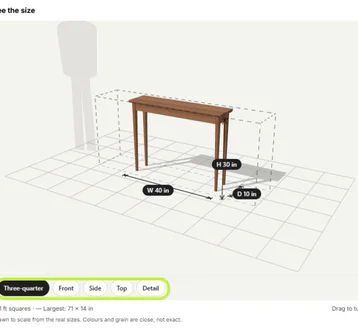
"Which one is depth?" "Will the 60 inch fit?" When a product comes in sizes, shoppers can't picture the numbers. RNS Product Visualizer adds a Size preview to your product page: pick a size or colour and a 3D piece redraws at that size, with width, depth and height labels on a floor grid.
Free plan · Pro $19 a month · 14-day free trial · billed by Shopify
↑ the size preview
How it works
- Add the block to your product template: one click from the app, then Save in the theme editor.
- Auto set up: the app reads each product's options and fills in the shape, the number for each size and a colour for each colour. You check and accept.
- Shoppers see it on the product page. It follows your theme's own option buttons, so the preview and the page always agree.
THE APP · 5 SCREENS · REAL SIZE
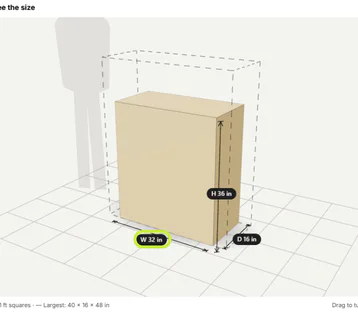
The Size preview on a product page, box at the picked width, with W, D and H labels.
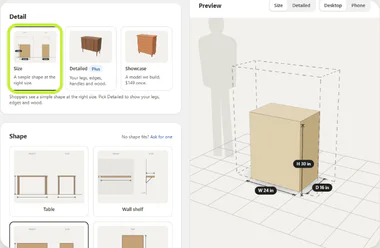
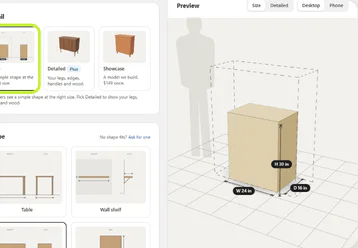
The editor: Detail and Shape fields beside a live 3D preview at the Size level, with W, D and H labels.
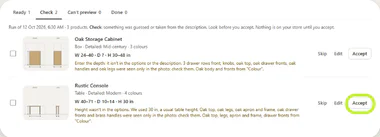
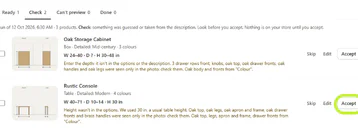
Review AI setup, Check tab: the AI's setups with notes; nothing goes live until Accept.
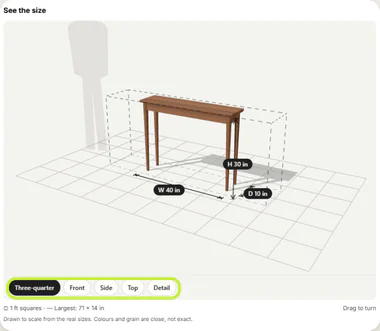
The Detailed look on a product page: legs, edges and wood, with the view buttons.
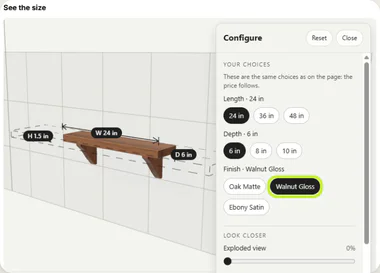
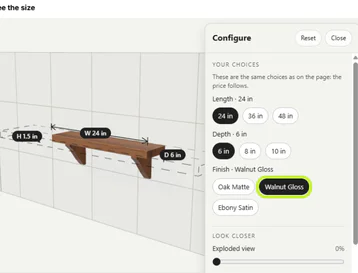
A Showcase model on a product page with the Configure panel open (length, depth, finish).
THE APP · 5 SCREENS · SWIPE
What you get
- A 3D size preview (and a simple drawing when a phone can't show 3D) that follows the product's size and colour options
- Width, depth and height labels on a floor grid; inches or centimetres, rugs in feet; a tap explains which side is which
- AI that reads your options and fills in the numbers; nothing goes live until you accept
- A product with a size the app can't read says "Fix needed" in the app; shoppers see "No preview for this size yet"
- Shapes: box (dressers, cabinets), wall shelf, table (square or round) and rug
- Detailed looks on Plus: legs, edges, handles and wood that look like your piece, and view buttons
- Showcase models: we build a detailed model of one product of any type, with a Configure panel for shoppers
- Shopper numbers: how often the preview was seen and used, and added to cart after using
- Download your setups to a file and restore them; turn everything off in one click
What it can't do
- Size and Detailed draw four furniture shapes (box, wall shelf, table, rug). Anything else (a lamp, a watch, a sofa) needs a Showcase model.
- It's a size preview, not a photo: Size shows a simple shape in your colour; Detailed is closer, Showcase closest.
- It reads sizes from the product's options (or numbers you type). A product with no size anywhere needs its numbers typed once.
- Shopify allows 3 options a product, so a product with width, depth, colour and finish needs one combined option (for example "Walnut Gloss").
- Themes with a custom size picker that doesn't use Shopify's variant may show the first size only.
Plans and price
- Size preview on 3 products (switch which 3 any time), 10 AI setups a month
- A small "Size preview by RNS" line under the block
- Every product, 500 AI setups a month
- Copy a setup to similar products; new products set up automatically, as drafts
- Shopper numbers per product; no RNS line
- Everything in Pro, 1,000 AI setups a month
- Detailed looks on every product; three-quarter, front, side, top and detail views
- Can add Showcase models
- Built by us from your photos, first version in about 5 working days
- 1 change round included, more at $49 each; live only after you approve it
- Cancel before we start and we refund it in full
One free trial per shop, across Pro and Plus. Billed by Shopify.
Questions
Do I need 3D files?
No. The app draws the piece from the sizes. Showcase models are made by us from your photos.
Will it slow my product page?
The block's first file is under 10 KB. The 3D part loads only when the block is near the screen, and falls back to a drawing on slow phones.
What does the app read?
Your products: title, description, options and main photo. Nothing about your customers or orders. The block sets no cookies.
What happens to my setups if I uninstall?
We delete your shop's data 48 hours after you uninstall. Download your setups first if you may come back. Showcase photos and large models in your Shopify Files stay there until you delete them.
Can I get a Showcase refund?
Yes, before we start work: cancel the request and we refund it in full through Shopify. Once a model is in progress, email us.
Set up and use
7 steps
- Install and choose a plan. On Home, Add the block ↗ (under "Add the block to your product page") opens the theme editor on the product template with the block ready; click Save.
- Products › Auto set up › Start: the app reads every product (or the ones you pick) and makes drafts. Nothing shows on your store yet.
- Review: each draft shows its shape, numbers and colours with a live preview. Accept, change or skip.
- Open a product to change anything: shape, which option is the width or depth, the number for each value, colours, finish. Save. The preview on the right is what shoppers see.
- In the theme editor, the block's settings change its heading, labels, frame and maximum width. Settings in the app: the other unit, rugs in feet, explainers, outline, shopper numbers.
- Plus: open a product › Detail › Detailed › pick a look (a preset, then parts and materials) › Save.
- Showcase: open a product › Detail › Showcase › Request a Showcase model (photos, notes) › Pay $149 and send › approve Shopify's charge. When the first version is ready, the request says "Ready to review" in the app: Approve and make live, or Ask for changes.
Learn more
- Guide: How to show product dimensions in Shopify
- Help: email support@rnsapps.com with your store address. We answer within one working day.