A price for every size, and the cart charges it
Shops that make blinds, curtains, cushions, glass, tabletops or rugs to size end up with a size chart, a "ask us for a price" button and a lot of emails. Calculator apps show a price, but the cart can still charge the base price. RNS Custom Size Calculator shows the shopper their size in 3D with your price, and Shopify's own cart step charges that price.
Free plan · Pro $19 a month ($190 a year) · 14-day free trial · most shops · billed by Shopify
- Free for 1 sized product
- Charged by Shopify at the cart and checkout
- Every order checked
A blind sized by the shopper, charged at the rule’s price, and the order checked. Sample product and amounts.
How it works
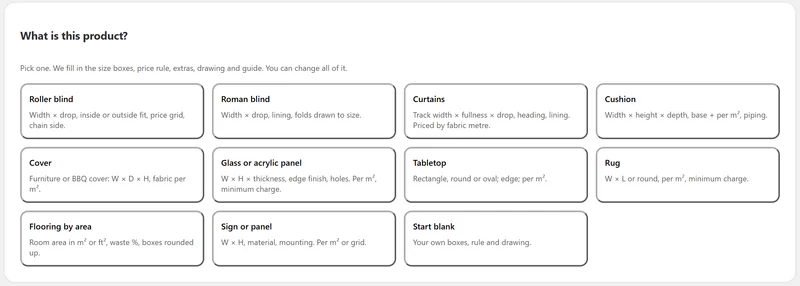
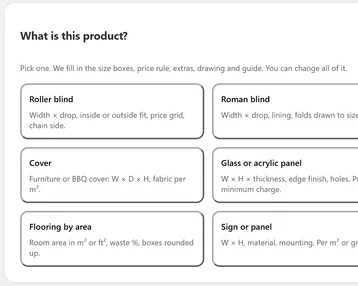
- Set up a product in minutesPick what it is: roller blind, curtains, cushion, glass panel, tabletop, rug and more. The app fills in the size boxes, your price rule, extras and a how-to-measure guide. Paste your own price grid from a spreadsheet, or let AI read the product and draft it for you to check.
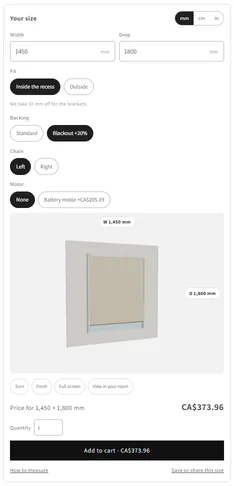
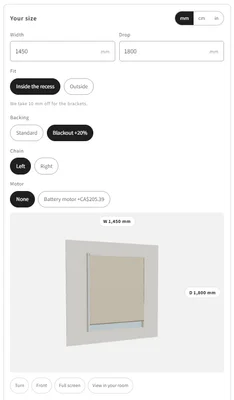
- The shopper types their sizeWidth and drop in metric or imperial, inside or outside the recess, with your extras. They see the item drawn in 3D at that size, and the price on the Add to cart button changes as they type.
- The cart charges your priceShopify works out each sized line from your saved rule, in the cart, the drawer and at checkout. A line with no size, or a size outside your limits, is stopped at the cart and checkout. The size is on the order for cutting.
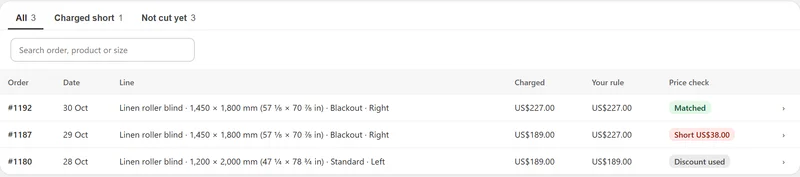
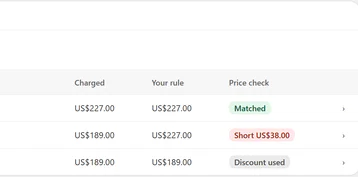
- Every order is checkedThe app compares what was charged with your rule. If a line was ever charged less, you see it on Home and get one email, and you decide what to do in Shopify.
THE APP · 5 REAL SCREENS
Size boxes, extras, 3D at the size typed, price on the button.
Eleven starting points, or set up with AI.
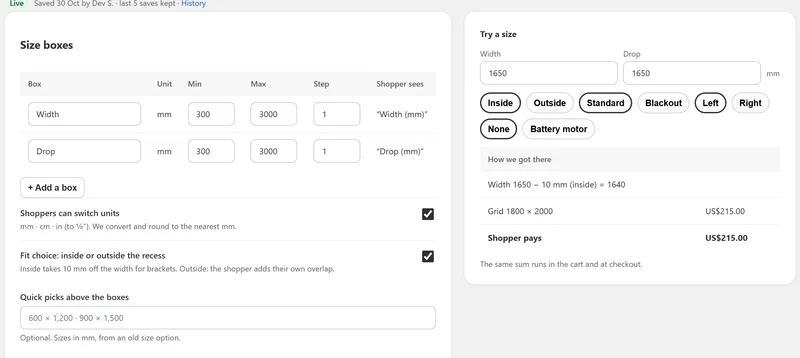
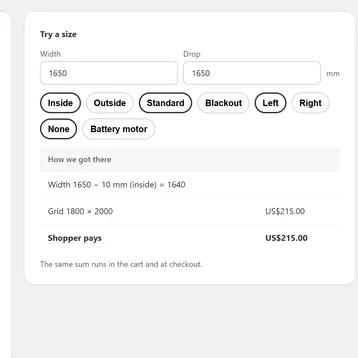
Size boxes beside Try a size, with how the price was worked out.
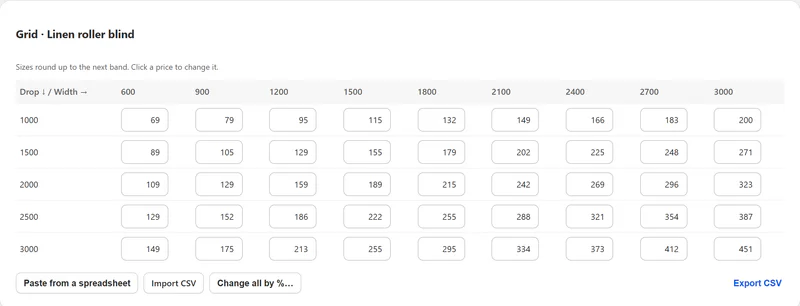
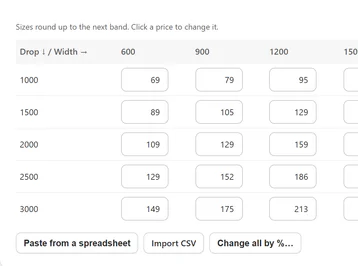
Grid in prices, with paste, CSV import and change all.
Orders with Matched, Short and Discount used.
THE APP · 5 SCREENS · SWIPE
Who it's for
Shops that cut, sew or build each item to the customer's size.
- 01Blinds and curtainsprice grids by width and drop, fit inside or outside the recess, fullness, lining and motors.
- 02Cushions, covers and upholsterya base price plus a price per m², piping and fabric grades.
- 03Glass, acrylic, signs and panelsper m² with a minimum charge, thickness, edges and holes.
- 04Tabletops, rugs and flooringrectangles, rounds and ovals, per m², waste and boxes rounded up; L-shapes on Plus.
What you get
- 11 starting points that fill in the boxes, price, extras, drawing and guide
- 5 kinds of price: grid, per area, base plus area, per running metre, or your own sum
- Minimum charge, rounding, size limits and a price for sizes past the grid
- Extras priced as a fixed amount, a %, or per m², shown only when they apply
- A 2D drawing at once and the 3D item at the size typed, with size labels
- How to measure, quick-pick sizes, and a link to save or share a size
- Shopify's cart step and checkout check, and an email if an order is ever charged short
- Orders with a price check per line, a cut sheet CSV and one email if anything is short
- The main shopper words in each of your storefront languages
What it can't do
- Quote odd jobs: a size past your limits links to your contact page, or to RNS Made to Order's request form if you use it.
- Price sized items at the POS or in draft orders: staff use the product’s Try a size to get the price, then enter it.
- Hold any number of sizes in one cart: a cart takes about 20 sized lines, fewer with many extras or different products. Past that, the shopper is asked to split the order.
- Take or collect money: if an order was ever charged short, you use Shopify's own Edit order.
- Draw furniture from size options: that's RNS Product Visualizer.
Plans and price
- 1 sized product, with every price rule, 2D and 3D
- Cart and checkout price, order checks
- 10 AI setups a month, "Sized by RNS" line
- Unlimited sized products
- 300 AI setups a month
- Copy setups, bulk price changes, no RNS line
- Everything in Pro
- View in your room (AR) at true size
- L-shapes for rugs and flooring, 1,000 AI setups a month
One free trial per shop. On RNS Product Visualizer? 50% off your first 3 monthly charges. Billed by Shopify.
Questions
Can I use my own price grid?
Yes. Paste it from a spreadsheet or import a CSV. Sizes round up to the next band, and you can price past the grid per m².
What if a shopper measures wrong?
Each product has a how-to-measure guide, inside or outside fit, and your smallest and largest sizes, with plain words when a size is out of range.
What happens if I uninstall?
The boxes and the cart step stop at once, and your sized products sell at their Shopify price again. Settings › Before you leave sets them to Draft in one click, or lists them to reprice. Our data is deleted 48 hours later.
Set up and use
6 steps
- Install the app. You start on Free (1 sized product); start Pro's or Plus's 14-day free trial from Plan when you need more.
- Home › What do you sell to size? Pick a starting point and Choose products. Or open a product and press Set up with AI: nothing goes live until you check it.
- On the product, check the boxes and extras, open Edit grid or Edit price to paste your prices, and use Try a size to see the exact sum. Press Go live.
- Home › Ready to sell: Add to theme opens your theme editor with the block in place; press Save. Turn on the size message so a theme's quick add asks for a size.
- Type a size on your own product page, add it to the cart and check the price at checkout. Nothing is bought until you pay.
- Orders shows every sized line with its check; download the Cut sheet CSV for the workshop. Settings: units, too-big sizes, shopper words per language, the block's look and alerts.
Why RNS
- 3D at the shopper's size, and AR in their room on Plus
- The price is worked out by Shopify from your rule, never taken from the browser
- Never charged by order count or by sales
Learn more
- Guide: How to sell custom sizes in Shopify with a price per size
- Related: RNS Product Visualizer shows furniture in 3D from its size options; RNS Made to Order takes custom requests from quote to delivery.
- Your data: what the app reads and keeps is on the privacy page.
- Help: email support@rnsapps.com with your store address. We answer within one working day.