Special orders and repairs for Shopify POS
Shopify POS can't keep some items of a sale back to collect later, and it has no repair desk. So special orders live on sticky notes and repairs in a paper book. RNS Counter puts both at the till, on any POS plan, POS Lite included.
14-day free trial · from $29 a month · billed by Shopify
- Works on POS Lite and POS Pro
- Special orders and repairs
- Test mode at install: no customer emails
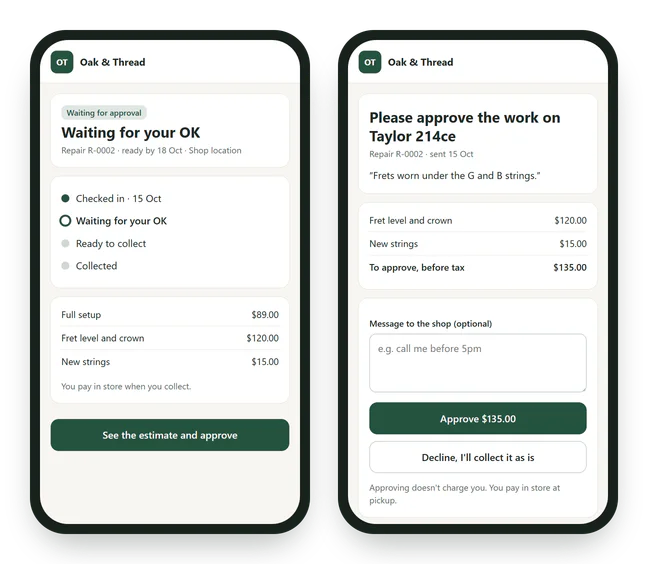
A repair estimate, sent from the ticket and approved online. Sample customer and amounts.
How it works
- Take the job in at the tillMark a cart line Order in, take a deposit with Shopify's own split payment and hand over only what goes home today. For a repair: check the item in with photos, what was left with it and a claim ticket the customer signs.
- Track itOpen lines group by supplier, ready to send as an order sheet. When stock arrives, the app matches it to the customer who waited longest. Repairs move across a board; technicians see their own jobs.
- Tell the customer and hand it over"Ordered", "arrived" and "ready" emails go out on their own; the customer approves a repair estimate online and checks the status without logging in. Reminders chase what isn't collected or paid. The balance is paid in POS at pickup.
THE APP · 5 REAL SCREENS
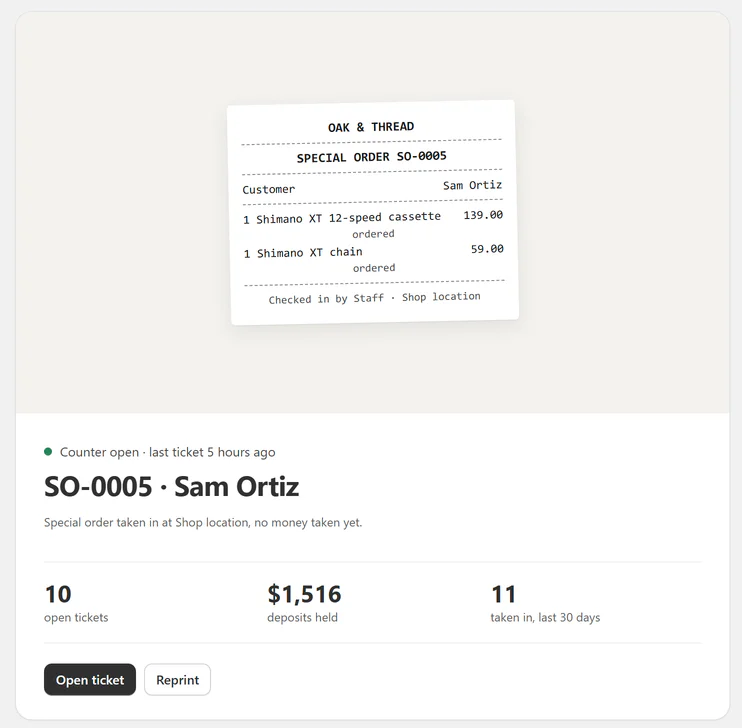
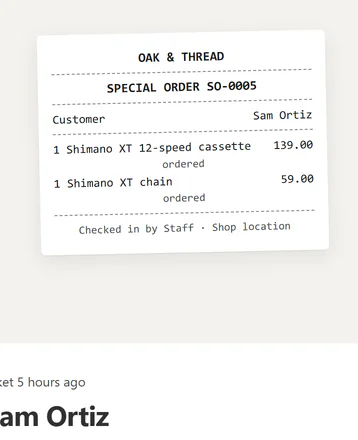
Home: the last ticket taken in with its slip, open tickets, deposits held, and Reprint.
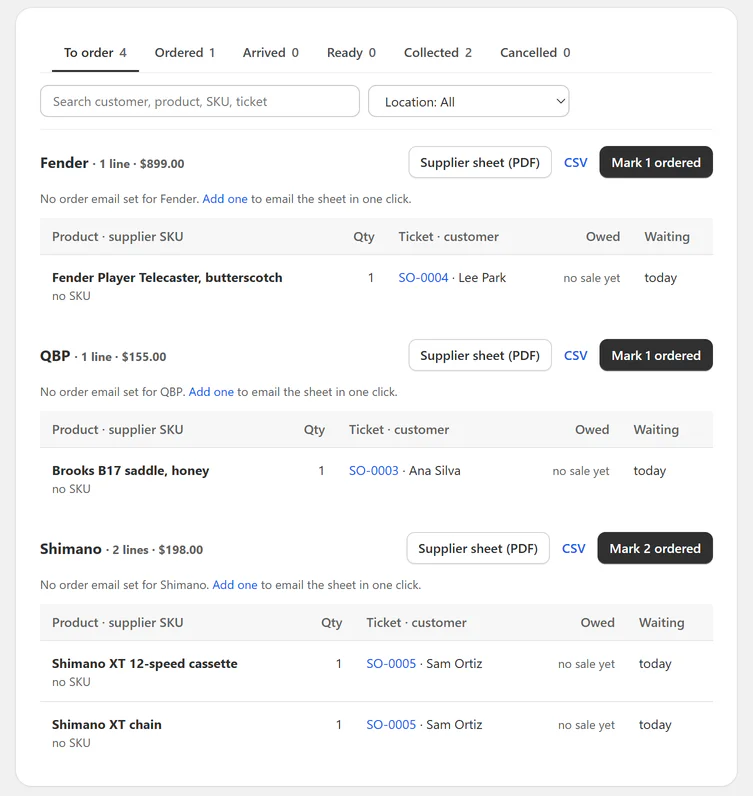
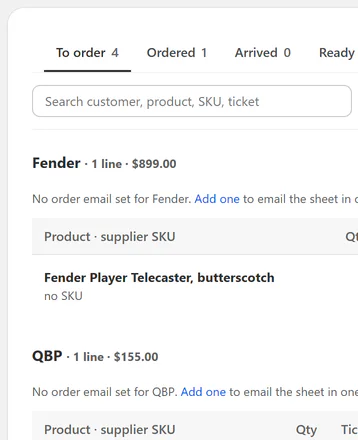
Special orders waiting to be ordered, one group per supplier, each with its sheet (PDF or CSV) and Mark ordered.
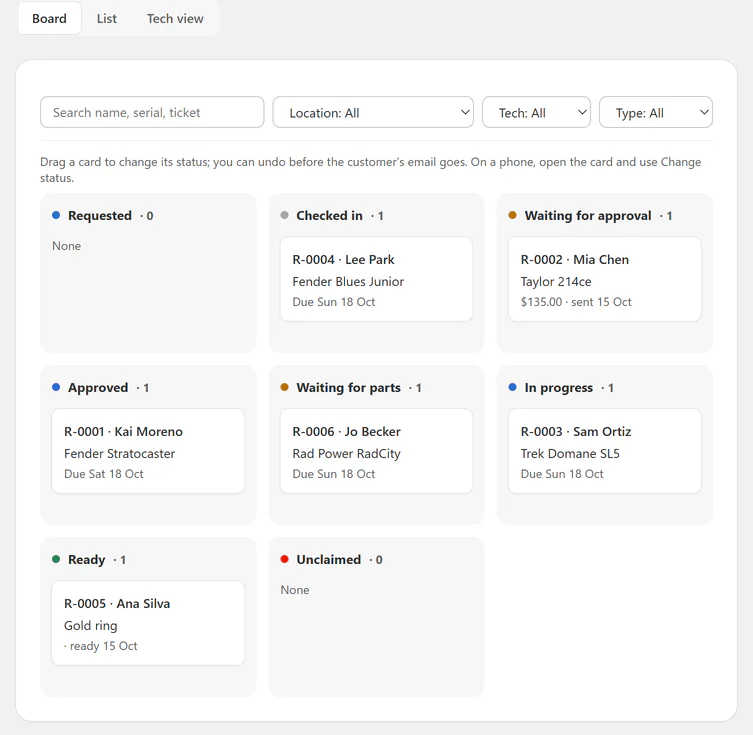
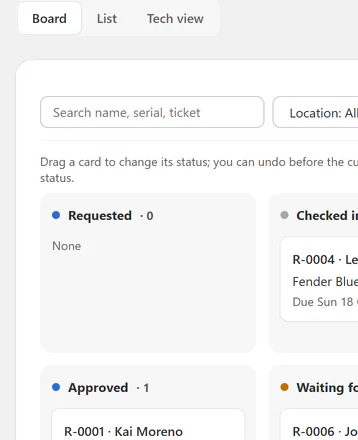
Every repair on one board: drag a card to its next status, with Undo before the customer's email goes.
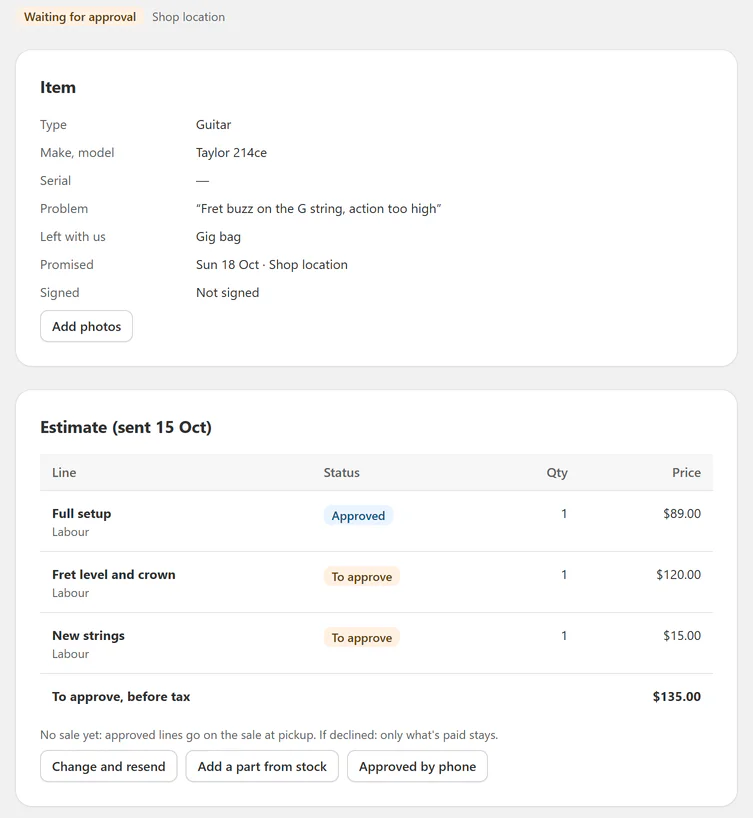
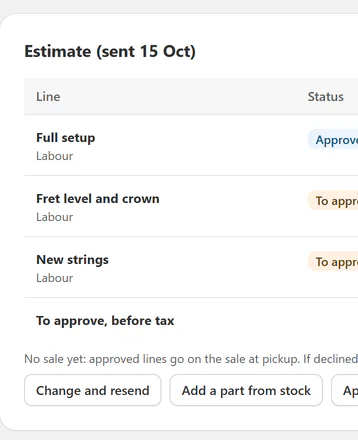
A repair ticket: the item, the problem, what was left with it, and the estimate lines the customer still has to approve.
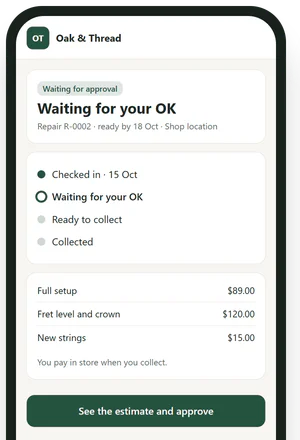
What the customer sees from the link in each email: where their repair is, and the estimate to approve or decline. No login.
THE APP · 5 SCREENS · SWIPE
Who it's for
Shops that sell in person and order in or fix things.
- 01Bridal and formal weargowns ordered in from the supplier, a deposit today, fittings, the rest at pickup.
- 02Bike and music shopsrepairs and special orders at the same counter, one app for both.
- 03Jewellersring sizing and repairs with photos and a signed claim ticket.
- 04Furniture, shoe, sewing and phone shopsitems ordered to the customer's choice, or left for repair.
What you get
- Order in on any cart line and Taking home today? after the sale
- Deposits and balances on Shopify POS payments, with reminders
- Supplier board, supplier sheets (PDF and CSV), arrival matching
- Repair check-in, claim tickets, item tags, estimates approved online, tech view
- Status page and online repair request form, 18 editable emails
- Reports, CSV export, and import of open tickets from RepairTracker or OrderMax
What it can't do
- Text messages: emails for now; staff call from the ticket.
- Take payments: every payment is Shopify POS's own; the app shows what's owed.
- Consignment: not yet.
Plans and price
- 1 location, both desks (special orders and repairs)
- Unlimited tickets, staff and technicians
- Emails, status page, slips, estimate approvals, CSV import
- Supplier list and order sheets, the "ready" reminder, basic reports
- Up to 3 locations, everything in Solo
- Arrival matching: arriving stock is set aside for the customer who waited
- All reminders: balance owed, not collected, unclaimed
- All reports and their CSVs
- Unlimited locations, everything in Counter
- Report CSVs by email, weekly or monthly
One free trial per shop. Shops using RNS Pickup Reminders, House Charge, Inventory Notes, Trade Accounts or Buy Counter: 50% off the first 3 months of a monthly plan. Billed by Shopify.
Questions
Do I need POS Pro?
No. It works on POS Lite and POS Pro, on any Shopify plan. Shopify's own pickup orders are whole-cart and POS Pro only.
How are deposits paid?
With Shopify's own payments: POS Split payment › Mark as partially paid. The balance is paid in POS at pickup. Counter never takes or records payments.
Anything to watch at the till?
Turn Mark as fulfilled off before payment on a sale with an Order-in item. Shopify can't undo it after.
I use RepairTracker or OrderMax. Can I switch?
Yes. Import your open tickets by CSV (up to 5,000 rows); undo for 7 days.
Can customers see their repair?
Yes, on a status page with no login, from the link in every email. They approve or decline an estimate there too.
Does it send texts?
Not yet. Customers get emails; staff can call from the ticket.
Set up and use
6 steps
- Install the app and start a plan's 14-day free trial. Test mode is on, so customer emails go only to your store's address.
- Home: pick your desks (special orders, repairs or both) and make a sample ticket to see the slip and the "ready" email.
- In Shopify POS: in Shopify admin add the Counter tile (Point of Sale › Settings › POS app › Add tile › Apps › Counter) and turn on its buttons (Apps for Point of Sale › Activate on). Turn Mark as fulfilled off on a sale with an Order-in item.
- Special order: tap a cart line › Order in, take a deposit with Split payment, then Taking home today? hands over the rest. Order it from Special orders › To order.
- Repair: Counter tile › New repair: photos, the customer signs, a deposit if you want one. Price the work on the ticket and Send estimate; the customer approves online.
- Settings: your statuses, the emails each one sends, deposits, suppliers and staff. Turn Test mode off when the test email looks right.
Why RNS
- Works on POS Lite and POS Pro, any Shopify plan; every payment stays Shopify's own
- Special orders and repairs in one app, at the same counter
- Never charged by ticket count; bring your open tickets from RepairTracker or OrderMax
Learn more
- Related: RNS Pickup Reminders chases local pickup orders nobody collected.
- Your data: what the app reads and keeps is on the privacy page.
- Help: email support@rnsapps.com with your store address. We answer within one working day.